

VMware Workstation Pro 26H1u1
VMware Workstation Pro 26H1u1 (Build 25688693, released September 3, 2026) is a free desktop hypervisor for Windows and Linux that's now fully 64-bit, supporting over 200 guest operating systems including Windows, Linux, and BSD variants. The 26H1 release added lifecycle timestamps for VM tracking, integrated folder notes, ARM-based ESXi remote connectivity, and support for Ubuntu 26.04 LTS, Fedora 43/44, and FreeBSD 15.0. The 26H1u1 update resolves CVE-2026-59346 (integer overflow) and CVE-2026-59347 (stack buffer overflow), plus adds automated Secure Boot Platform Key remediation. It's free for commercial, educational, and personal use, no license key required. Compared to VirtualBox, VMware offers ~3.2x better disk I/O performance, superior 3D graphics support, and tighter vSphere integration, though VirtualBox remains the better choice for macOS hosts and open-source purists.
- Free
- Windows
- Linux
- Nov 7, 2026
3d775c3c2153600eef4642f95d519a514ba7e861400bda2598352bff792db473VirusTotal report ↗da823c853cc7e57be7b9b070c8aed20fe9d75fd519ae6f175ab1dafc7283002eVirusTotal report ↗Screenshots
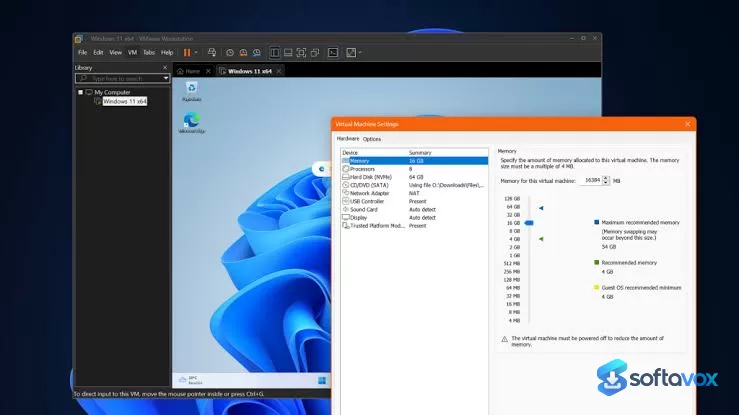
About VMware Workstation Pro
VMware Workstation Pro Download, Desktop Virtualization Software
TL;DR Quick Take / Who is this for?
VMware Workstation Pro is a desktop hypervisor that lets you run multiple x86-based operating systems, Windows, Linux, and others, simultaneously on a single physical PC, without rebooting. The 26H1 release marks a significant architectural shift: the Windows application is now fully 64-bit, delivering a more stable and performant foundation for demanding virtualized workloads. The other headline change is licensing. Since November 2024, Workstation Pro has been free for personal, educational, and commercial use, with no license key required. The 26H1u1 update (build 25688693) addressed two critical security vulnerabilities, CVE-2026-59346 and CVE-2026-59347, that could allow an attacker inside a virtual machine to execute code on the host. On performance, independent benchmarks position VMware ahead of VirtualBox, with roughly 3.2× higher sequential read throughput and approximately 5.6× the frame rate in GPU-bound rendering tests. The trade-offs are consistent with a professional-grade tool: it is resource-hungry, the interface can feel slow at times, and support through Broadcom’s portal is not always responsive. VMware Workstation Pro is the right pick for developers, IT professionals, and power users who need reliable, high-performance desktop virtualization and are prepared to manage its resource demands. It is not the best choice for users on low-spec hardware or those who want the absolute simplest free option.
Quick Info Box
| License Type | Free (personal, educational, and commercial use; no license key required) |
|---|---|
| File Size | Approx. 268–289 MB (Windows installer); 302 MB (TechSpot download) |
| OS Compatibility | Windows 10/11 (64-bit host); Linux hosts (Ubuntu, Fedora, SUSE); macOS via Fusion |
| Latest Version | 26H1u1 (build 25688693, September 2026) |
| Developer | Broadcom (VMware) |
Key Features & Real-World Usability
VMware Workstation Pro’s core value is the ability to replicate server, desktop, and tablet environments inside a virtual machine, allocating multiple processor cores, gigabytes of RAM, and graphics memory to each guest. The 26H1 release focuses on architectural modernisation and quality-of-life improvements rather than a feature overhaul. The 64-bit Windows application is the most consequential change: by ensuring that binaries, libraries, installer components, and services all execute as 64-bit processes, Broadcom is aligning the hypervisor with modern hardware and software standards, which improves stability and performance in memory-heavy scenarios. New visibility features include lifecycle timestamps that let you identify VMs by creation and last powered-on time, integrated folder notes displayed directly in folder tabs, and a modernised saved credential format that makes encrypted VMs and remote servers easier to identify in the host platform’s credential manager. Remote connectivity has also expanded: Workstation Pro 26H1 can connect to ARM-based ESX hosts, enabling basic virtual machine operations directly through the console. The 26H1u1 update added automated Secure Boot platform key remediation, including silent PK updates on ESX and Capsule PK updates that work without interrupting TPM-based applications. Guest and host OS support has been updated to include Ubuntu 26.04 LTS, Fedora 43 and 44, SUSE Linux Enterprise 16, openSUSE 16.0, and FreeBSD 15.0. The known issues are minor but worth noting: after upgrading on Windows hosts, ISO files from a previous installation may remain in the old directory and continue to consume disk space unless manually removed. The interface is functional and information-dense, though some users describe it as clunky and slow to expand inventories.
- Full 64-bit Windows application: All binaries, libraries, installer components, and services now execute as 64-bit processes, improving stability and performance for memory-intensive virtual machines.
- Broad guest OS support: Run multiple x86-based Windows, Linux, and other operating systems simultaneously, with updated support for Ubuntu 26.04 LTS, Fedora 43/44, SUSE Linux Enterprise 16, openSUSE 16.0, and FreeBSD 15.0.
- ARM-based ESX remote connectivity: Connect to remote ARM-based ESXi hosts and perform basic virtual machine operations directly from the Workstation Pro console.
- Lifecycle timestamps: Identify VMs by creation and last powered-on time, simplifying long-term project tracking and cleanup of temporary test environments.
- Integrated folder notes: View VM notes directly in folder tabs, keeping critical metadata and documentation accessible without navigating individual settings menus.
- Modernised credential manager: Saved credentials for encrypted VMs and remote servers are easier to identify within the host platform’s native credential manager.
- Automated Secure Boot PK remediation (26H1u1): New features simplify platform key remediation for VMs and resolve certificate expiration issues for Microsoft Secure Boot.
- Free for all use cases: No license key is required for personal, educational, or commercial use, removing the previous barrier to professional deployment.
Pros, Cons & Community/User Feedback
User sentiment around VMware Workstation Pro is generally positive on capability and performance, with recurring complaints about resource consumption and interface responsiveness. On Capterra, the product holds a 4.8 average from 57 reviews, with reviewers highlighting its ability to efficiently utilise hardware resources by running multiple virtual machines on a single device. One long-term user described it simply as “simple” with configurable CPU settings, while others praise its suitability for graphics acceleration, Kubernetes, and container work. A TrustRadius reviewer noted thousands of dollars in savings from virtualizing legacy operating systems. The positives are consistent: VMware is widely regarded as the performance leader among desktop hypervisors, with independent benchmarks showing roughly 3.2× higher sequential read throughput than VirtualBox and approximately 5.6× the frame rate in GPU-bound rendering tests. Stability improved significantly after version 6, and the tool is considered highly reliable for professional workloads. The complaints fall into three categories. First, resource consumption: reviewers note that the software “may require significant system resources, which could potentially impact the performance of the host machine,” and that virtual machines can take too much memory depending on settings. Second, interface performance: users report that the application “takes some times to open and sometimes it is freezing,” and that it is “clunky and slow to expand inventories”. Third, support quality: a TrustRadius reviewer described support as “useless,” and another noted that the network adapter can cause VM crashes in specific development scenarios. The security dimension is important. The 26H1u1 update resolved CVE-2026-59346 and CVE-2026-59347, both of which could allow an attacker inside a VM to execute code on the underlying host. Broadcom published advisory VMSA-2026-0007 and recommended that users update as soon as possible. Running an unpatched version therefore carries a real risk, and the update should be treated as mandatory rather than optional.
Pros
- Free for personal, educational, and commercial use with no license key required
- Best-in-class performance among desktop hypervisors, with roughly 3.2× the sequential read throughput of VirtualBox
- Full 64-bit Windows application in 26H1 for improved stability and memory handling
- Broad guest and host OS support, including the latest Ubuntu, Fedora, SUSE, and FreeBSD releases
- ARM-based ESX remote connectivity for managing VMs on ARM servers
- Lifecycle timestamps, folder notes, and modernised credential management improve day-to-day usability
- Automated Secure Boot PK remediation in 26H1u1 simplifies a previously manual process
- 4.8 average rating from 57 Capterra reviews, with users praising hardware utilisation and reliability
Cons
- Significant system resource consumption, which can impact host performance
- Application can be slow to open and occasionally freezes, especially with large VM inventories
- Support through Broadcom’s portal is described by some users as unresponsive or “useless”
- Network adapter issues have caused VM crashes in specific development scenarios
- Upgrading on Windows may leave old ISO files in the previous installation directory, consuming disk space
- Critical security vulnerabilities (CVE-2026-59346, CVE-2026-59347) require the 26H1u1 update
- Interface is functional but can feel clunky and dated compared with modern tools
Final Verdict & Safe Download Advice
VMware Workstation Pro is the most capable desktop hypervisor available, and the fact that it is now free for all use cases, personal, educational, and commercial, removes the main reason many users previously chose alternatives. The 64-bit 26H1 architecture is a meaningful improvement for stability and performance, the OS support is current, and the performance gap over VirtualBox is substantial enough to matter for development, testing, and graphics-accelerated workloads. For developers, IT professionals, and power users who need reliable virtualization on a capable machine, it is the default recommendation. The caveats are real. Workstation Pro is resource-hungry, the interface is not always responsive, and support is not a strength. The 26H1u1 security update is not optional: it closes two critical VM escape vulnerabilities that could allow an attacker inside a guest to compromise the host. If you are on an earlier build, update immediately. If you are on low-spec hardware or you want the simplest possible free option for occasional use, VirtualBox remains a lighter alternative, albeit with lower performance. For everyone else, Workstation Pro is the benchmark.
- Download only from the Broadcom Support Portal: The legitimate installer is distributed through Broadcom’s support portal after registering a Basic User account. Third-party “VMware Workstation free download” pages may repackage installers or offer outdated builds. The official portal is the only source that guarantees the 26H1u1 security fixes.
- Verify the installer size and version: The Windows installer for 26H1 is approximately 268 MB, and the 26H1u1 update is around 289 MB. The current build is 25688693. A dramatically smaller file or an older version number is a warning sign.
- Update immediately if you are on an earlier build: CVE-2026-59346 and CVE-2026-59347 are critical VM escape vulnerabilities fixed in 26H1u1. Running an unpatched version leaves the host exposed to code execution from inside a guest VM.
- Check system requirements before installing: Workstation Pro requires a 64-bit x86 CPU, at least 4 GB of RAM (8 GB or more recommended for multiple VMs), and approximately 1.2 GB of free disk space for the application itself, plus additional space for each virtual machine.
- Select the free personal use option during installation: When prompted for a license key, choose the option for Personal Use or select “Finish” for the free version. No license key is required, and entering one is unnecessary for the free tier.
- Remove old ISO files after upgrading: If you upgrade from an earlier version and install to a different path, check the previous installation directory (for example, C:\Program Files (x86)\VMware\VMware Workstation\) for leftover ISO files and delete them to reclaim disk space.
Similar software


Key features
- Completely Free, No license key required for commercial, educational, or personal use
- Fully 64-Bit Application, All binaries, libraries, and installer components now run as 64-bit processes on Windows
- Lifecycle Timestamps, Track VM creation time and last powered-on time to identify stale VMs at a glance
- Integrated Folder Notes, VM notes displayed directly in folder tabs for quick metadata access
- ARM ESXi Remote Access, Connect to remote ARM-based ESXi hosts for basic VM operations
- Secure Boot PK Remediation, Automated Platform Key remediation for expired Microsoft Secure Boot certificates
- Silent Platform Key Update in ESX, Automatically fixes invalid VMW.NULLPK keys on guest reboot
- Capsule Platform Key Update, Updates Secure Boot and vTPM-enabled Windows VMs without interrupting TPM applications
- New Guest OS Support, Ubuntu 26.04 LTS, Fedora 43/44, SUSE Linux Enterprise 16, openSUSE 16.0, FreeBSD 15.0
- New Host OS Support, Ubuntu 26.04 LTS, Fedora 43/44, SLES 16 GA, openSUSE 16.0
- Snapshots & Checkpoints, Save and restore exact VM states for risk-free testing
- Seamless Mode, Integrate VM applications into the host desktop for a native feel
- Virtual Networking, Set up isolated networks, restrict copy-paste, and encrypt VMs for security
- vSphere & Cloud Integration, Move VMs between local and cloud environments
- 200+ Supported Operating Systems, Run Windows, Linux, BSD, and niche OSes in isolated sandboxes
- Security Fixes, Resolves CVE-2026-59346 (integer overflow) and CVE-2026-59347 (stack buffer overflow)
Frequently asked questions about VMware Workstation Pro
Is VMware Workstation Pro free?
Is VMware Workstation Pro safe to use?
What is VMware Workstation Pro used for?
What systems does VMware Workstation Pro run on?
How does VMware Workstation Pro differ from VirtualBox?
Why did drag and drop or display scaling stop working after upgrading?
How do I update VMware Workstation Pro?
Versions
| Version | Release date | Platform | File size | |
|---|---|---|---|---|
| VMware Workstation Pro 26H1u1 Latest version | Sep 4, 2026 | WindowsLinux | 267.6 MB | Download |
Comments about VMware Workstation Pro
No comments yet. Share your experience with this program!